
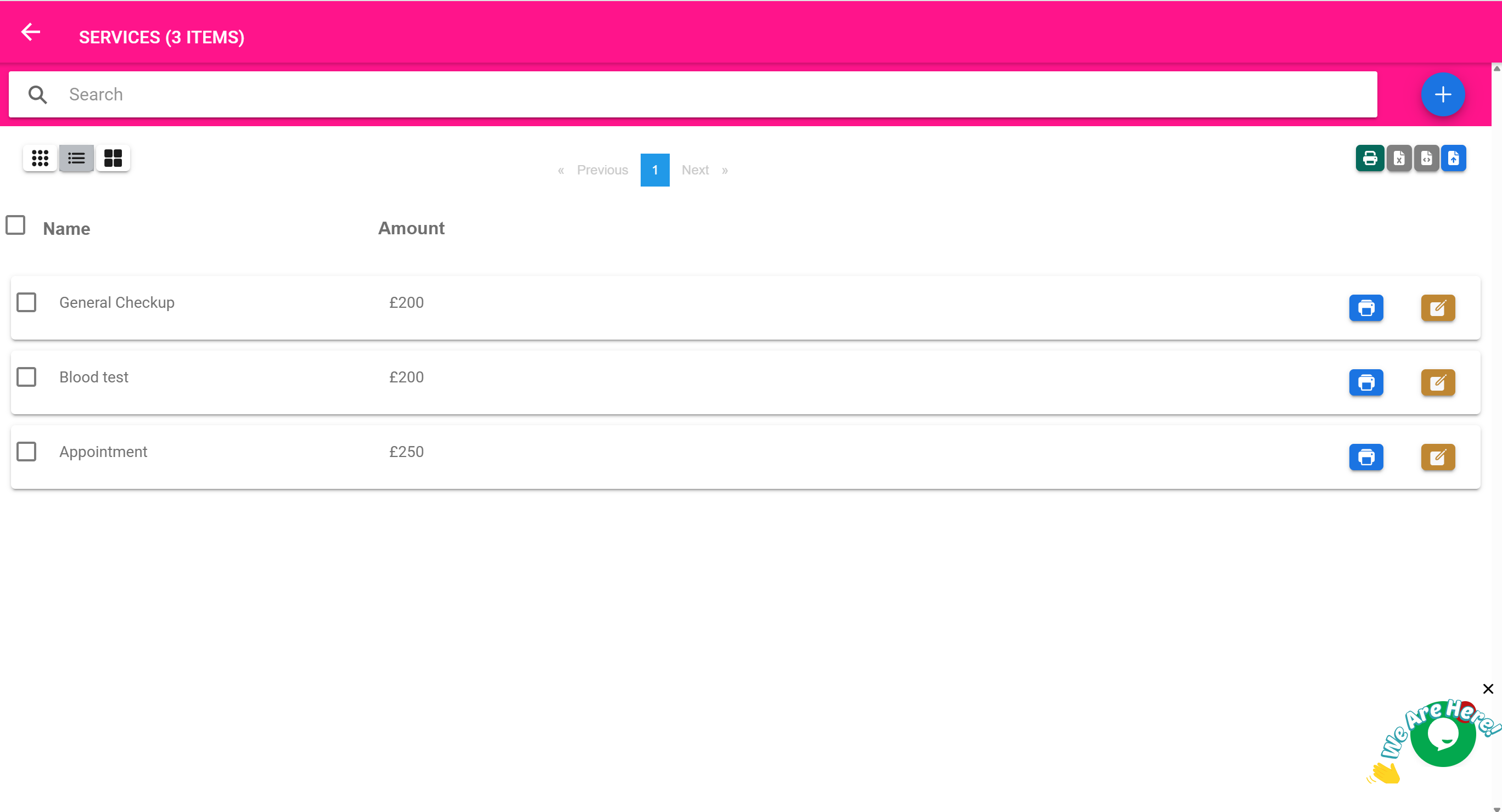
🧾 Billable Services Page
“Define and manage non-product services that can be billed to customers.”
🎯 Purpose of This Page
The Billable Services Page allows you to define custom services that can be added to:
- POS sales
- Income bills
- Quotations or invoices
These services are not tied to physical inventory, but represent activities or intangible offerings such as:
- Consultation fees
- Diagnostic procedures
- Physiotherapy sessions
- Transportation charges
- Packaging or admin fees
Once defined, services can be reused consistently across billing workflows.
🛠️ What You Can Do On This Page
| Feature | Description |
|---|---|
| ➕ Add New Service | Define a new service with a name and default price |
| 🔍 Search Services | Quickly find a service by name |
| 💵 Set Price | Define a fixed or per-use rate |
| ✏️ Edit / Delete | Update or remove existing service entries |
| 🧾 Use in POS / Billing | Once defined, services appear in the POS and Income pages |
🧰 Example Workflow: Adding a Consultation Service
- Your clinic charges a $25 general consultation fee for all walk-in patients.
- Open the Billable Services Page
- Click Add New
- Enter:
- Name: General Consultation
- Price: $25.00
- Save
✅ The service now appears in the dropdowns within the POS and Billing pages, allowing staff to quickly select it during checkout.
🏥 Common Examples of Billable Services
| Service Name | Description |
|---|---|
| General Consultation | Base fee for any medical appointment |
| Wound Dressing | Charge for clinical wound care |
| ECG Test | Cost for electrocardiogram procedure |
| Sample Collection Fee | Separate fee for home or in-clinic sample pickup |
| Delivery Service | Optional courier charge for home deliveries |
| Admission Processing | Administrative fee for new inpatient entries |
📦 Services vs. Products
| Feature | Products | Services |
|---|---|---|
| Tracked in inventory | ✅ Yes | ❌ No |
| Has expiry | ✅ Possible | ❌ No |
| Billable | ✅ Yes | ✅ Yes |
| Used in POS | ✅ Yes | ✅ Yes |
| Can be taxed | ✅ Yes | ✅ Yes |
➕ Using Services in Billing
Once services are added to this list, they can be:
- Added as line items in Income bills
- Included in POS transactions along with products
- Included in Quotations and Invoices
🧠 This ensures pricing is consistent, and staff don’t need to manually type service descriptions during checkout.
🧾 Example Use Case: Packaging Fee
- You want to add a fixed $1.00 packaging charge to every sale.
- Add a billable service: "Packaging Fee – $1.00"
- Train staff to include it in every POS transaction
- It appears on the receipt and is tracked like any other billed item
🧠 Best Practices
- Use clear, customer-friendly service names
- Set prices that include tax (if applicable)
- Group similar services by naming convention (e.g., “Lab – Malaria Test”)
- Update prices periodically through this page — changes reflect immediately across the system